


The October 2026 monthly patch for Embers Adrift is out. The main additions are a revamped options menu and a new way to pick graphics settings automatically. Trading has been cleaned up, and there’s a handful of quality-of-life tweaks and bug fixes.
Auto-detect graphics and display changes
A new Auto-Detect Settings button checks your graphics card, video memory, display resolution and system memory. It then recommends a Rendering Budget and adjusts the related settings to match. Nothing is applied until you confirm the recommendation.
The developers say the presets are based on performance data from real play sessions. That data showed vegetation and shadows take up most of the frame time, so those settings change the most between budgets. Lighter options like Reflections and Contact Shadows stay on for most systems. Humanoid Textures are now chosen based on available video memory, since that setting matters most in crowded areas. On higher resolution displays, auto-detect also turns on dynamic resolution: DLSS on supported NVIDIA cards, and STP on other hardware.
Auto-detect never touches your resolution, full screen mode, Shadow Distance, tone mapping or Night Brightness. New installs run it automatically on first launch. Existing players keep their current settings unless they press the button themselves.
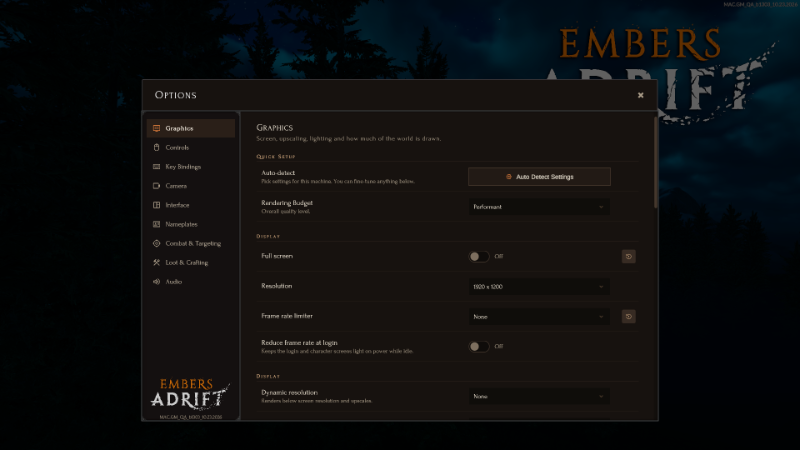
Display handling has been reworked as well:
- Full screen and windowed mode now each remember their own resolution. Full screen always starts at your monitor’s native resolution.
- If you play in full screen, you’ll start at native resolution after this update. Windowed players keep their current window size.
- Changing resolution in full screen now asks for confirmation. If you don’t confirm within 15 seconds, or the screen goes blank, it reverts automatically.
- The resolution list refreshes when you move the window to another monitor.
- On macOS, full screen now uses the system’s native mode, so you can reach the menu bar at the top of the screen. The separate Maximized Window option on macOS has been removed.
New options menu, trading and fixes
The options menu has been reorganized and should feel more responsive. Your existing settings carry over. Changes include:
- A reset-to-default button appears on any option that isn’t at its default value.
- The resolution dropdown mostly no longer lists refresh rates. The exception is Alternate full screen mode on Windows, where you can still pick a refresh rate.
- Built-in confirmation dialogs for auto-detect, keybind conflicts and full screen resolution changes.
- Keybinds are now grouped into sections. Bindings are shown on the labels for Toggle Nameplates, Toggle All Windows and Show Compass.
- Toggle Compass now only flips the setting when “hold to show” is disabled.
The team hopes to bring this updated UI style to the rest of Embers Adrift in the future.
Trading should also be more reliable. If two players request a trade with each other at the same moment, that’s now handled cleanly. An incoming request window closes on its own if the request times out, the other player leaves or logs off, or trading is no longer possible. Chat messages now name the other player and explain cancelled trades or trades that failed because you were too far apart, instead of showing a generic result code.
Other changes in this patch:
- A new Torch cosmetic slot.
- Ashen kill requirements adjusted for Redshore Bulletin Board Tasks.
- Bags can now be dragged underwater.
- While diving, backpack and group member tooltips show whether they are above or below you.
- Target reticles are now double sided.
- Nav fixes to stop NPCs floating above some surfaces, plus nav fixes in Grizzled Peaks.
- Better collision in the central cave, and an underwater spot that should have been blocked is now blocked.
- Fixed windows that could turn into “ghosts”, plus text fixes for a Baerdin quest title and Alchemy Sweep.
The full notes are available on the Embers Adrift Steam page.
Source: Embers Adrift official news.
